
When money leaves your payment app but does not appear in your wallet, it is natural to wonder what happened. The same uncertainty can arise when a withdrawal remains pending, your wallet balance looks different from what you expected, or a transaction is missing from your history.
This Raxi Win Wallet Help guide explains how to check these situations, what information to keep, and what to do before contacting support. The aim is to help you understand the next step without making assumptions about your transaction or asking you to repeat a payment unnecessarily.
Understanding Your Raxi Win Wallet
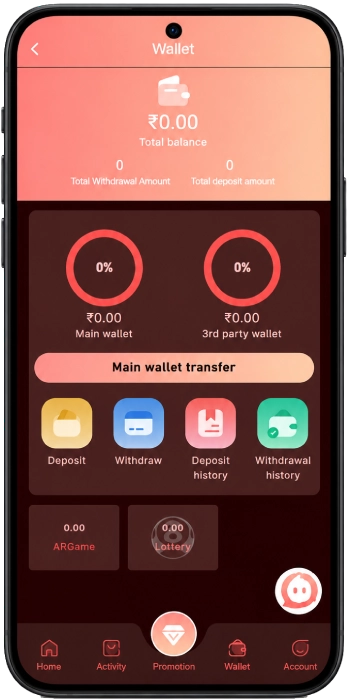
The Raxi Win Wallet screen displays your total balance, total deposit amount, and total withdrawal amount. It also shows two separate balances: Main Wallet and 3rd Party Wallet.
The wallet interface includes these options:
- Deposit: Opens the available deposit methods and amount-selection options.
- Withdraw: Opens the withdrawal section, where the available payment methods and instructions are displayed.
- Deposit History: Helps you review deposit records.
- Withdrawal History: Helps you review withdrawal records.
- Main Wallet Transfer: Provides access to the wallet-transfer feature.
These options serve different purposes. For example, the total deposit amount is not necessarily the same as your current available balance. Similarly, a withdrawal request and a completed withdrawal are not the same thing.
If something looks incorrect, start by identifying which figure or transaction you are trying to check.
1. RaxiWin Deposit Successful but Balance Not Updated
You have made a payment, the amount appears to have been deducted, but your Raxi Win wallet still shows the old balance. Before making another payment, check what happened to the original transaction.
What should you check first?
Step 1: Check your payment app or bank statement
Find the transaction and review its current status. Does it show as successful, pending or failed? Do not rely only on a payment notification if the transaction details show something different.
Step 2: Open Deposit History
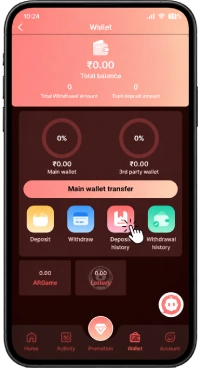
The Raxi Win wallet interface provides a separate Deposit History section. Open it and look for the relevant record. You can also use the available payment-method and date filters to narrow down the list.
Step 3: Compare the details
Check the amount, approximate transaction time, and payment reference, if available. Confirm that you selected the intended deposit channel and followed the instructions shown during the payment process.
Step 4: Decide what to do next
If the payment is pending, check its status with the payment provider before trying again.
If the payment failed, check whether the provider confirms that the amount was reversed or remains unsettled.
If the payment shows as successful but no corresponding wallet credit appears, contact the official platform support channel with the relevant transaction details.
A successful payment notification does not, by itself, confirm that the wallet balance has been updated.
Important: Do not repeat a payment simply because the balance has not changed. First establish the status of the original transaction.
2. Raxi Win Withdrawal Pending or Not Received
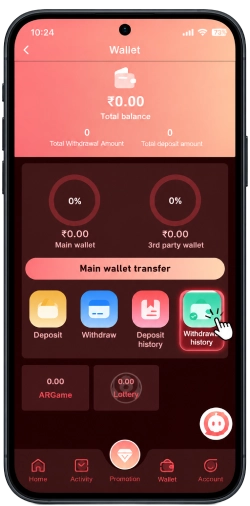
A withdrawal can be worrying when the amount is no longer available in the wallet but has not appeared in the destination account. First, check the request status before submitting another withdrawal.
How to check a withdrawal?
- Open the RaxiWin Wallet section.
- Select Withdrawal History.
- Find the relevant record using the available filters.
- Check the displayed status, amount, date, and payment method.
- Compare the record with the destination account or payment service.
The interface includes filters for payment methods, status, and date. Their exact available values may vary, so use the options displayed on your own screen.
What if the withdrawal is still pending?
A pending status means you should not assume that the request has either completed or failed. Check any processing guidance shown by the platform and retain the transaction details.
If the stated processing period has passed, or the status remains unclear, contact official support and ask for the current status of that specific request.
What if the withdrawal shows as successful but the money has not arrived?
Check the destination account and the payment provider’s transaction history. Confirm that the destination details correspond to the withdrawal request.
If the money still cannot be located, ask official support for a transaction reference or other available confirmation that can help trace the payment.
Avoid submitting repeated withdrawal requests while the original transaction remains unresolved. This can make it harder to distinguish between separate requests.
3. Deposit Failed, but Money Was Deducted
A failed deposit and a failed payment are not always the same thing. Your payment provider may show a deduction even when the platform does not display a completed deposit.
If this happens, keep the following information ready:
- The amount you attempted to deposit.
- The approximate date and time.
- The payment method or channel used.
- The payment reference or transaction ID, if available.
- A screenshot of the transaction status, with sensitive information hidden.
Check whether the payment provider marks the transaction as failed, pending or successful. If the provider confirms a deduction but the platform has no matching deposit record, report the discrepancy through official support. Do not assume that a refund has been initiated until you have confirmation. Likewise, do not assume the money is permanently lost simply because the deposit does not appear immediately.
If the payment provider offers a transaction-dispute or payment-support process, you can ask them to investigate the deduction as well.
4. Raxi Win Wallet Balance Looks Incorrect
Your total wallet balance, total deposit amount, total withdrawal amount and individual wallet balances represent different figures. They should not automatically be treated as interchangeable.
For example, the total amount deposited over time is a transaction total. It is not necessarily the amount currently available to withdraw.
If your balance looks wrong, use this checklist:
- Review your recent deposit and withdrawal records.
- Check whether a transaction is still pending.
- Compare the Main Wallet and 3rd Party Wallet balances separately.
- Review any visible transfer or transaction records.
- Check whether the displayed figures change after refreshing the page or reopening the wallet.
If the figures still do not make sense, record the balance shown, the approximate time and the relevant transaction details. Contact official support and ask them to explain the difference.
Do not share your password or one-time verification code when reporting a balance issue.
5. Main Raxi Win Wallet and 3rd Party RaxiWin Wallet: What’s the Difference?
The Raxi Win wallet screen displays separate balances for the Main Wallet and 3rd Party Wallet, along with a Main Wallet Transfer option.
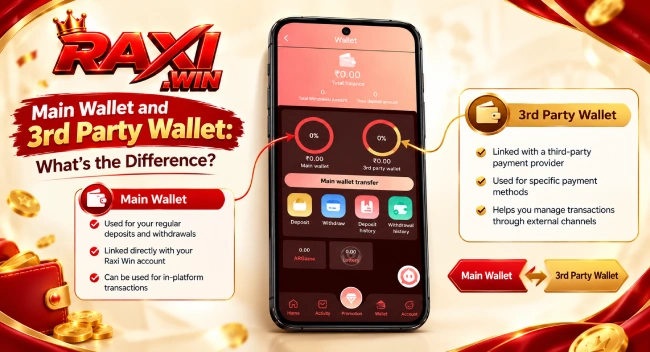
Seeing two balances does not necessarily mean that the same amount is available in both places. Before transferring funds, check the instructions and confirmation details shown in the interface.
If a transfer appears unsuccessful or the balances do not update as expected:
- Check both displayed wallet balances.
- Look for any transaction or transfer confirmation available in the interface.
- Refresh the wallet and check again.
- If the transfer remains unresolved, contact official support with the time, amount, and any available reference.
The screenshots do not establish the transfer rules, supported directions, fees or processing times. Check the current on-screen instructions rather than assuming that every transfer works the same way.
6. How to Find a Missing Deposit or Withdrawal Record?
Sometimes the issue is not the transaction itself, but finding the correct entry in the history. The RaxiWin interface has separate pages for Deposit History and Withdrawal History. Both display payment-method filters and a date selector, as well as a status filter.
Try the following:
- Check the correct history page. A deposit record belongs in Deposit History, while a withdrawal request should be checked in Withdrawal History.
- Review the selected date. If you are searching for an older transaction, make sure the selected date includes the time when it was made.
- Check the payment-method filter. If a specific method is selected, switch to the all-methods option if available.
- Review the status filter. A filter may hide records that have a different status.
- Confirm the transaction time. A transaction made near midnight may be easier to locate by checking the adjacent date as well.
If the record still does not appear, keep the payment confirmation and contact official support. A missing history entry alone does not establish whether a payment succeeded or failed.
7. What Information Should You Share With Support?
A clear report makes it easier to identify which transaction needs investigation. Instead of sending several vague messages, prepare the details relevant to the problem.
| Information | Why it helps |
|---|---|
| Transaction date and approximate time | Helps locate the relevant record |
| Amount involved | Distinguishes the transaction from others |
| Payment method | Identifies the channel used |
| Transaction or reference ID | Helps trace the payment, where available |
| Status shown by the payment provider | Clarifies whether it is pending, failed or successful |
| Screenshot of the relevant record | Provides supporting context |
Share these details only through a verified, official support channel. Hide unrelated financial information before sending a screenshot.
Never share your password, OTP, PIN, or full card security details. A request for these credentials should be treated cautiously.
You can explain the problem in a short message such as:
“My transaction for [amount] was made on [date and approximate time] using [payment method]. My payment provider shows [status], but my wallet shows [what you see]. The transaction reference is [reference ID, if available]. Could you please check the transaction status and advise me on the next step?”
Replace the bracketed details with your own information, and do not include sensitive authentication credentials.
8. Common Raxi Win Wallet Mistakes to Avoid
When a transaction does not look right, it is easy to act quickly and accidentally create another problem. These precautions can help:
- Do not pay twice without checking the original transaction. First establish whether the initial payment is pending, failed or successful.
- Do not submit repeated withdrawal requests to speed things up. An additional request does not establish what happened to the first one.
- Do not rely on a single screenshot of the balance. Review the relevant transaction record and payment status.
- Do not guess the meaning of a status. Use the platform’s displayed explanation or ask support to clarify it.
- Do not use unverified support contacts. Navigate through the official platform or a support channel you can independently verify.
- Do not share OTPs or passwords. Transaction troubleshooting should not require you to disclose these credentials to another person.
If real money is involved, keep your payment confirmation and transaction references until the issue has been resolved.
Frequently Asked Questions
Check the transaction status with your payment provider, then review Deposit History. If the payment is confirmed but the wallet credit is missing, report the transaction with its reference details. Avoid making the same payment again until the original status is clear.
Open Wallet, select Withdrawal History and locate the relevant request. Use the available date, payment-method and status filters to help find it.
Review the displayed status and any current processing guidance. If the request remains unresolved beyond the stated period, contact official support with the transaction details.
The total deposit amount represents deposits recorded over time, while the wallet balance shows a current balance. These figures serve different purposes and may not be equal.
Check the date and payment-method filters, then review the payment provider’s record. If the transaction remains missing, contact official support with the reference number and confirmation details, if available.
It is better to establish the status of the first payment before repeating it. Otherwise, you could end up with two transactions when only one was intended.
Review your recent transactions and both wallet balances. If you cannot reconcile the figures, save the relevant details and ask official support to investigate.