
Raxi Win Deposit Guide: How to Add Money to Your Wallet
Adding money to your Raxi Win wallet should be a straightforward process, but payment screens can sometimes leave users unsure about which option to choose, how much to enter, or what to do after making a payment. This guide explains the deposit options visible on the RaxiWin Game interface, how to check your payment status, and what to do if money is deducted but your wallet balance does not update.
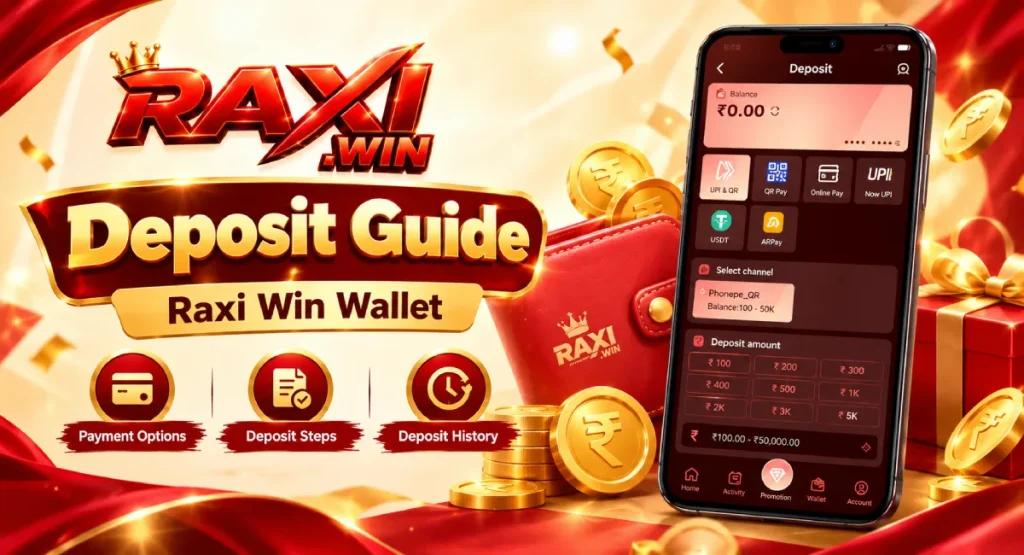
Before making a deposit, take a moment to review the selected payment method, the amount displayed on the screen, and the instructions provided for that transaction. If something does not look right, it is better to verify the details before proceeding.
How to Make a Deposit on Raxi Win?
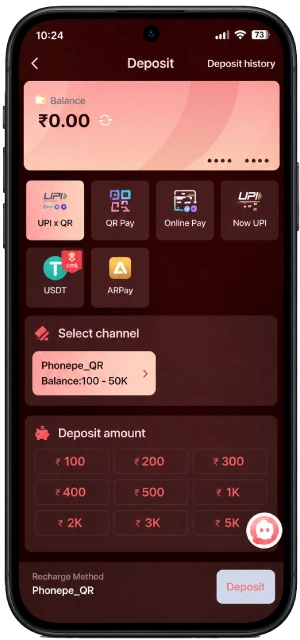
The Deposit page includes several payment options, a channel selection area, preset deposit amounts, an amount entry field, and recharge instructions. The exact options available to you may depend on the current interface and payment channel.
Follow these general steps:
- Open the Wallet section. Navigate to the Wallet page in your Raxi Win account and select Deposit.
- Review the available payment methods. Your screen may display options such as UPI & QR, QR Pay, Online Pay, Now UPI, USDT, or ARPay. Choose an option only after checking the instructions and confirming that it is suitable for your payment.
- Select the deposit channel. The screenshot shows a channel labelled PhonePe_QR with a displayed balance range. Read the channel details carefully before continuing. Do not assume that the same channel or limits will always be available.
- Enter the deposit amount. You may see preset amount buttons, including ₹100, ₹200, ₹300, ₹400, ₹500, ₹1K, ₹2K, ₹3K, and ₹5K. The available choices may change, so check the amount shown on your own screen.
- Review the recharge instructions. Check the payment details and any warnings displayed before completing the transaction.
- Complete the payment through the displayed process. Follow the instructions provided for the selected payment channel. Avoid sending money to unverified payment details.
- Check your wallet balance and Deposit History. After completing the payment, verify whether the balance has updated and whether a corresponding transaction appears in your history.
If the page displays an error, an unexpected payment amount, or unclear instructions, pause and verify the details instead of making repeated payments.
Which Deposit Payment Methods Are Available?
The RaxiWin Deposit screen shown in the supplied interface displays these options:
| Payment option | What to check before proceeding |
|---|---|
| UPI & QR | Verify the displayed payment details and amount before paying. |
| QR Pay | Check the QR code and confirm the recipient details wherever available. |
| Online Pay | Read the instructions shown for the selected payment channel. |
| Now UPI | Confirm that the option is available and follow the displayed steps. |
| USDT | Check the supported network, destination details, and amount requirements before sending cryptocurrency. |
| ARPay | Review the instructions and any applicable account or payment requirements. |
These are the options visible in the provided screenshot, not a guarantee that every method will always be available. Payment methods and instructions can change.
Never send money to a payment address or QR code received from an unverified person. For cryptocurrency transfers, pay particular attention to the network and destination address because an incorrectly directed transaction may be difficult or impossible to recover.
What Should You Check Before Making a Deposit?
A few checks before paying can help prevent avoidable mistakes.
- Confirm the amount. Make sure the amount entered on the Raxi Win Deposit page matches the amount you intend to send.
- Review the payment destination. Check the recipient details displayed by the selected payment method before authorising a transfer.
- Read the recharge instructions. The screenshot includes a warning to contact support if the transfer time limit expires and to fill out the deposit form again when instructed. Follow the current on-screen instructions for your particular transaction.
- Keep the payment confirmation. Save the transaction reference, payment status, amount, and approximate time. These details can help when investigating a missing deposit.
- Avoid duplicate payments. If a payment is already processing, check its status before attempting the same deposit again.
- Protect your account. Do not share your password, OTP, banking PIN, or other confidential payment credentials with anyone claiming to help.
These checks do not guarantee that every payment will succeed, but they can make it easier to identify what happened if a transaction goes wrong.
Deposit Successful, but the Raxi Win Wallet Balance Has Not Updated?
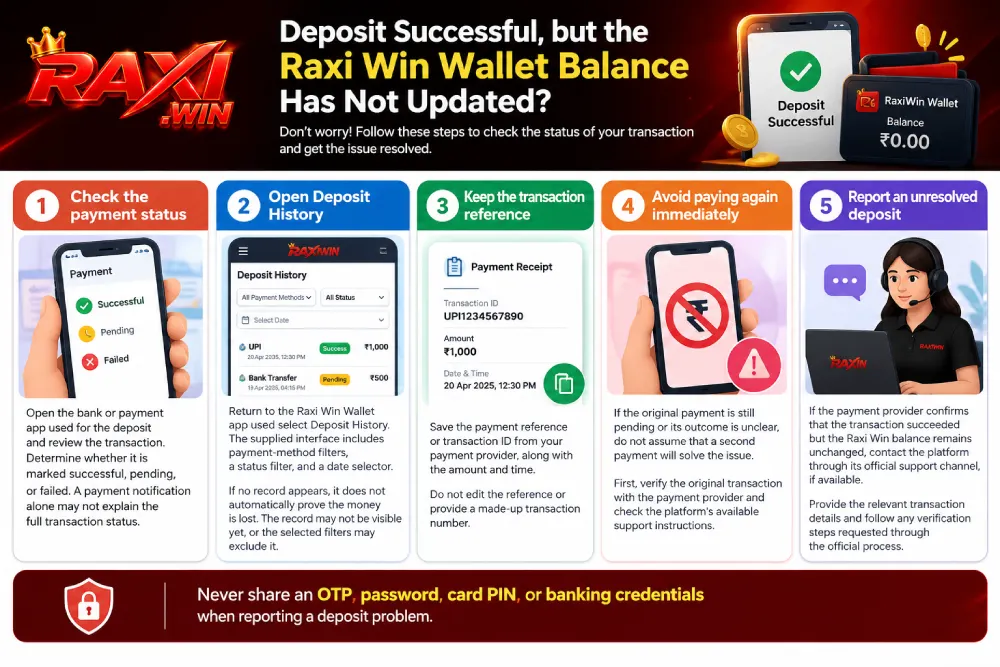
This situation can be frustrating. Your payment app may show the money was deducted, while the RaxiWin wallet still shows the previous balance. First, confirm the status of the original transaction before taking any further steps.
Step 1: Check the payment status
Open the bank or payment app used for the deposit and review the transaction. Determine whether it is marked successful, pending, or failed. A payment notification alone may not explain the full transaction status.
Step 2: Open Deposit History
Return to the Raxi Win Wallet page and select Deposit History. The supplied interface includes payment-method filters, a status filter, and a date selector.
Check the relevant date and payment category. If no record appears, that does not automatically prove the money has been lost or the payment has failed. The record may not be visible yet, or the selected filters may exclude it.
Step 3: Keep the transaction reference
Save the payment reference or transaction ID from your payment provider, along with the amount and time. Do not edit the reference or provide a made-up transaction number.
Step 4: Avoid paying again immediately
If the original payment is still pending or its outcome is unclear, do not assume that a second payment will solve the issue. First, verify the original transaction with the payment provider and check the platform’s available support instructions.
Step 5: Report an unresolved deposit
If the payment provider confirms that the transaction succeeded but the Raxi Win balance remains unchanged, contact the platform through its official support channel, if available. Provide the relevant transaction details and follow any verification steps requested through the official process.
Never share an OTP, password, card PIN, or banking credentials when reporting a deposit problem.
What If a RaxiWin Deposit Fails After Money Is Deducted?
A failed or interrupted payment can leave you uncertain about whether the money will return or whether the deposit will be credited. The next step depends on the transaction status shown by your bank or payment provider.
Start with these checks:
- Open the payment app or bank account used for the transaction.
- Review whether the payment is pending, failed, reversed, or successful.
- Check Deposit History in Raxi Win for a matching entry.
- Save any available confirmation or reference number.
- If the transaction remains unresolved, contact the relevant payment provider and the platform’s official support channel, as appropriate.
Do not assume that a failed deposit will be refunded instantly. The timing and outcome depend on the payment provider and the specific transaction. Use the provider’s official guidance rather than relying on an estimated refund time from an unofficial source.
How to Check Your Raxi Win Deposit History?
Deposit History is useful when you need to review an earlier payment or investigate a missing wallet credit.
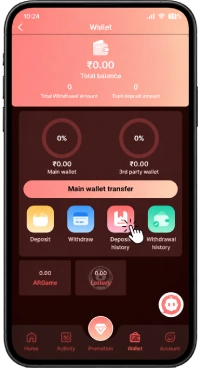
On the interface shown in the screenshot, the page contains:
- Payment-method filters, including an All option and other available categories.
- A status filter labelled All.
- A Choose a date selector.
- A transaction area that displays records when available.
To investigate a particular payment, open Deposit History, select the relevant date, and review the available filters. If the page shows “No data,” check whether the chosen date or payment-method filter is correct before concluding.
If the transaction still cannot be found, compare the details against your payment provider’s record and keep the reference number ready if you need assistance.
Why Is My Deposit Not Showing in Deposit History?
There can be more than one explanation for a missing record, and the screen alone may not tell you which one applies.
Possible things to check include:
- Whether you selected the correct date.
- Whether a payment-method filter is hiding the relevant record.
- Whether the payment is still processing with the provider.
- Whether you have a valid payment confirmation or transaction reference.
- Whether the platform’s official support team can locate the transaction.
The screenshot displays “No data,” but this is only the state of that screen at the time it was captured. It does not establish that deposits are unavailable or that a payment has failed.
Note: If you’re facing any other wallet-related issue, including balance discrepancies, pending transactions, or difficulties with wallet transfers, visit our Raxi Win Wallet Help guide for practical troubleshooting steps and further assistance.
Frequently Asked Questions
What is the minimum deposit amount on Raxi Win?
The screenshot shows preset amounts starting at ₹100, but this alone does not establish the minimum permitted deposit for every payment method. Check the amount field and current instructions displayed for your selected channel before making a payment.
How long does a Raxi Win deposit take?
The available screenshot does not confirm a standard processing time. Check the status shown by your payment provider and read the current instructions on the Deposit page. If the transaction remains unresolved, use the official support route available to you.
What should I do if money is deducted but my wallet balance remains unchanged?
Check the payment status, review Deposit History, and save the transaction reference. If the payment provider confirms success but the wallet does not update, report the issue through the official support channel. Avoid repeating the payment while the original transaction is unresolved.
Can I use any payment method shown on the Deposit page?
Use only the methods currently displayed and follow their instructions. Availability may vary, and you should verify the payment destination and any applicable requirements before sending money.
Why does Deposit History show “No data”?
Check the selected date and payment-method filters first. If the expected transaction still does not appear, compare it with your payment provider’s record and seek assistance if necessary.
Is it safe to share my payment screenshot with support?
A relevant payment confirmation may help investigate a transaction, but review it before sharing. Hide unnecessary personal or financial information. Never disclose passwords, OTPs, PINs, or other confidential authentication details.
A Final Check Before You Deposit
A deposit problem is easier to investigate when you have the correct payment status, transaction reference, and date available. Before making a payment, verify the amount and recipient details. After paying, check the transaction status and Deposit History rather than assuming that a deduction automatically means the wallet has been credited.
If something does not match, pause, keep the evidence, and use the appropriate official support channel. The aim is to understand the transaction and resolve the issue safely—not to make another payment before the first one is clear.