
Raxi Win Withdrawal Guide: Process, Payment Options & Common Issues
Withdrawing money from Raxi Win Game involves more than selecting an amount and pressing a button. Before submitting a withdrawal request, it is important to check your available balance, understand the payment options shown on your account, and make sure the required payment method is ready to use.
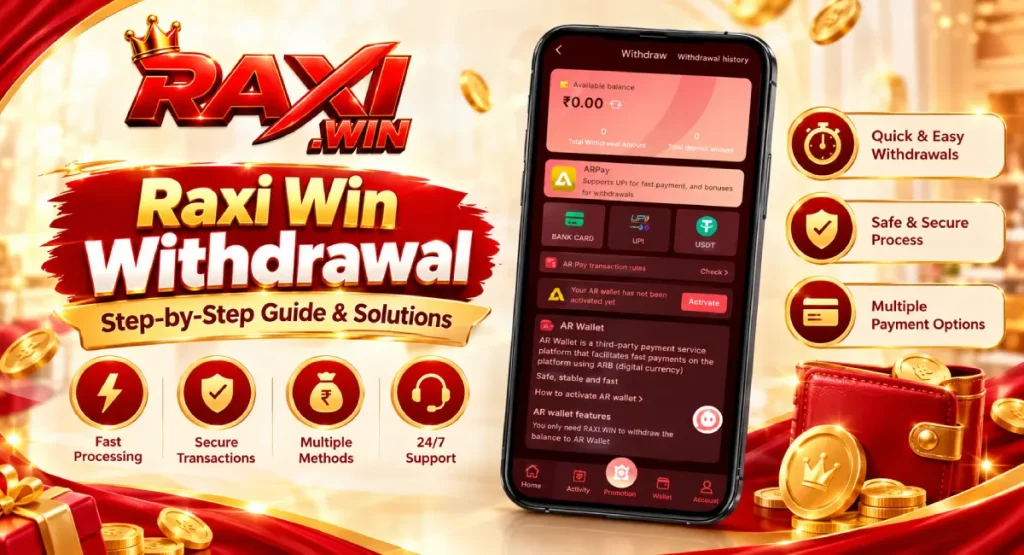
The Raxi Win withdrawal page displays options such as ARPay, Bank Card, UPI, and USDT. The options available to you may depend on your account and the payment channels currently displayed on the platform. You may also see an AR Wallet activation message before using a particular withdrawal option.
This guide explains how the withdrawal process works, what to check before requesting a payout, and what to do if a withdrawal remains pending or does not appear in your account.
What Is a Withdrawal on RaxiWin?
Withdrawal is the process of requesting money from an available platform balance to an eligible payment destination. It is different from depositing money, which means adding funds to a wallet.
The Raxi Win Withdrawal page shows your available balance and the payment methods presented by the platform. Depending on the option selected, you may be asked to choose a linked payment destination or complete an additional setup step before continuing.
Keep these three points in mind: –
- Available balance: The amount displayed as available for withdrawal may be different from your total wallet balance.
- Payment method: Check which withdrawal methods are currently shown and whether you have completed their required setup.
- Transaction status: Submitting a request does not necessarily mean the transfer has
How to Withdraw Money from Raxi Win?
Before starting, sign in to your account and open the Wallet section. Use the following steps as a practical guide, while following any additional instructions displayed on your own withdrawal screen.

- Open the Wallet section. Locate the Wallet option in your account and select Withdraw.
- Check your available balance. Review the balance shown on the withdrawal page before deciding how much to request.
- Choose a withdrawal method. Select one of the options displayed on your account, such as Bank Card, UPI, USDT, or ARPay.
- Complete any required setup. If the page asks you to activate AR Wallet or provide payment details, read the instructions carefully before proceeding. Do not assume that every method follows the same setup process.
- Enter the withdrawal amount. If an amount field appears, enter the amount you intend to request and check it before continuing.
- Review the details. Confirm the selected payment method and any destination details shown on the screen. Correct mistakes before submitting the request.
- Submit and check the status. Follow the on-screen confirmation process, then open Withdrawal History to see whether the request has been recorded and what status is displayed.
The exact sequence can vary by payment method. If a step or field is not available on your screen, do not enter unrelated information or assume that a different method has identical requirements.
Which Withdrawal Methods Are Available?
The withdrawal page may show several payment options. Their availability and requirements can differ, so select a method based on what your account actually displays.
| Withdrawal option | What to check before using it |
|---|---|
| Bank Card | Check the card details requested by the platform and make sure the information is accurate. |
| UPI | Confirm the UPI details requested on the screen before submitting the withdrawal. |
| USDT | Carefully verify the required wallet address and network, if these fields are provided. Sending digital assets to an incorrect address or network may be difficult or impossible to reverse. |
| ARPay / AR Wallet | Read the activation instructions and any transaction rules displayed before using this option. |
Not every method will necessarily be available for every account. Minimum or maximum amounts, verification requirements, fees, and processing times should be confirmed from the current on-screen rules rather than assumed.
What Should You Check Before Requesting a Withdrawal?
A few checks before submission can help prevent avoidable mistakes.
- Available balance: Make sure the amount you want to request is supported by the balance and any applicable withdrawal conditions.
- Payment details: Carefully review your bank, UPI, or digital-wallet information. A typing error can send a request to the wrong destination.
- Selected method: Confirm that you have chosen the intended withdrawal option and followed its instructions.
- Activation or verification: If the platform requests account verification or wallet activation, read the requirements before proceeding.
- Transaction rules: Review any minimum amount, limit, fee, or other condition explicitly shown on the withdrawal page.
- Confirmation screen: Check the amount and destination details one final time before submitting.
Keep a record of the request if a confirmation or transaction reference is provided. It can help you identify the correct entry later in Withdrawal History.
Why Is AR Wallet Activation Required?
The Raxi Win withdrawal screen may display a message such as “Your AR wallet has not been activated yet,” along with an Activate button. If you see this message, it indicates that the AR Wallet option is not ready to use through the screen in its current state.
Before activating it, open the instructions and review what information or steps are requested. Make sure you understand any transaction rules, fees, or conditions shown before agreeing to them. Do not share your account password, OTP, or private wallet credentials with anyone claiming to help with activation.
If you do not want to use ARPay, check whether another withdrawal method is available on your account. The activation message alone does not establish that every other withdrawal option requires AR Wallet activation.
What If Your RaxiWin Withdrawal Is Pending?
A pending status means the request has not yet been shown as completed. It does not, by itself, confirm whether the payment will succeed or fail.
If your withdrawal remains pending:
- Open Withdrawal History and locate the relevant request.
- Check the status, amount, date, and any reference number available.
- Review any instructions or updates shown for that transaction.
- Avoid submitting repeated requests for the same amount while the original request is still unresolved.
- If the status does not change, use the platform’s available support route and provide the transaction reference, if one exists.
Do not rely on a fixed processing time unless the platform explicitly states one for your selected method. Different payment channels may follow different procedures.
How to Check Raxi Win Withdrawal History?
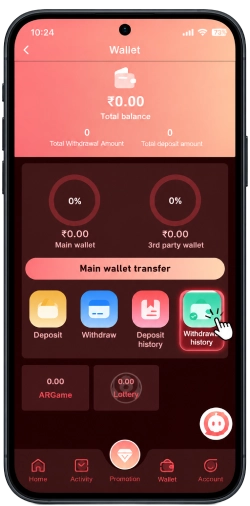
Withdrawal History helps you review the withdrawal requests recorded against your account. It is especially useful when you need to confirm whether a request was submitted or check its current status.
To review your records:
- Open Wallet and select Withdrawal History.
- Check the available filters, which may include payment methods or transaction status.
- Select a date or status filter if needed.
- Find the relevant request and review the details displayed.
If the page shows “No data,” first check whether the selected date, payment-method filter, or status filter is limiting the results. Clear the filters or select the appropriate date range and check again. If the request is still missing, confirm whether it was submitted successfully before trying again.
Frequently Asked Questions
How long does a RaxiWin withdrawal take?
The time can depend on the selected payment method and the platform’s current processing rules. Check the withdrawal page for any stated timeframe, and use Withdrawal History to review the request status.
Can I withdraw my entire wallet balance?
Not necessarily. The amount available for withdrawal may depend on the balance and any applicable conditions displayed by the platform. Check these details before submitting a request.
Why does Raxi Win ask me to activate an AR Wallet?
The withdrawal screen may require activation before the AR Wallet option can be used. Read the activation instructions carefully and check whether another withdrawal method is available if you prefer not to use ARPay.
What should I do if my withdrawal is pending?
Check Withdrawal History for the latest status and any transaction reference. Avoid submitting duplicate requests while the original one remains unresolved.
Why is my withdrawal missing from Withdrawal History?
Check the selected date and filters first. If the request still does not appear, verify whether it was submitted successfully and consult the platform’s available support route if needed.
Final Checks Before You Withdraw
Before submitting a Raxi Win withdrawal request, confirm your available balance, select the correct payment method, review the destination details, and read any transaction conditions shown on the screen. After submission, keep track of the request through Withdrawal History instead of relying only on the balance displayed in your wallet.
If you encounter a problem, focus on the specific withdrawal request and its status. A clear record of the amount, date, payment method, and transaction reference—where available—will make it easier to explain the issue and seek appropriate assistance.
For other wallet-related topics, including deposits and transfers between wallet balances, visit the RaxiWin Wallet Help guide.